How to redeem Upsi Black promo codes
You might be lucky enough to have gotten a promo code entitling you to a discount for an Upsi Black subscription. Here's how you can redeem it in just a few steps:
New subscribers
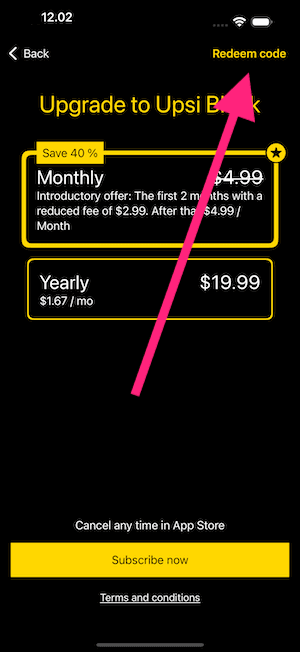
If you don't have an active Upsi Black subscription, you can redeem your code from the Purchase View:
Tap any "Get Upsi Black" button in the app.
OR go to your Profile View and select the product promo card for Upsi Black.
Existing subscribers
If you already have an active Upsi Black subscription (e.g. you received a recurring yearly partnership code), you can redeem your code directly from your profile:
Go to the Profile tab (third from left).
Scroll down to your Upsi Black subscription card.
Tap "Redeem code" below the subscription details.
Enter your code and confirm. The offer will apply at your next subscription renewal.
Redeeming the Code
In the Purchase View or your Profile, locate and tap the "Redeem Code" button.
A popup will appear where you can enter the code you have.
Carefully type in the code exactly as provided (careful with the uppercase and lowercase letters).
After entering the code, confirm your entry.
If the code is valid, the App Store or Google Play purchase flow will open to complete your redemption. For mistakes or expired codes an error message is shown.
Important Notes
Most promo codes can only be used once.
Promo codes usually have an expiration date, so be sure to redeem yours before it expires.
For existing subscribers, the redeemed offer takes effect at your next renewal date, not immediately.
If you encounter any issues redeeming your code, please contact the entity that provided it to you or reach out to our support team for assistance.
Enjoy your Upsi Black experience, and happy disc golfing!